Search This Blog

Monday, November 28, 2016

Have jolly and cyber safe time...

The time of the year where we use the word 'jolly' more than any other time of the year is upon us. It is a most wonderful time of the year for sure.

It is also the time when we are shopping! And increasingly we are shopping online. We all like get the boxes at the front door!

I don't like sending messages like this one. They make me feel a lot less jolly and more like a grinch.

When we are shopping online, we are giving different organizations a fair amount of our personal information. Therefore we should all take steps keep our usernames and strong passwords secure. Here are some tips how to do that: Tips for Secure Online Shopping.

In summary this article tells us:

  1. Don't shop at a site if you're not comfortable
  2. Never click on links from spam emails to make purchases
  3. Check the web address to make sure you are on the correct site
  4. Check that the site is secure
  5. Use a credit card or an online payment service
  6. Do not use a public computer to shop online
  7. Only use a secure connection when you place your order
  8. Use strong passwords
You may also see more email activity afterwards from various companies. Be on the lookout for phishing schemes. Here is some good advice on how to avoid being phish fried: Avoid Phishing Fraud. 

Maybe to help us sort through this a bit further, John Nunnally provided an analysis of how to deal with a real example that was recently received by people at Harding.'

Please take some time to take a look at this example.

_____________________________________________________________

No links! It Must Be Safe…. Wrong.

Phishing Scheme – Analysis, Case 1: Remittance Advice

Here is a message recently received by a person at Harding:
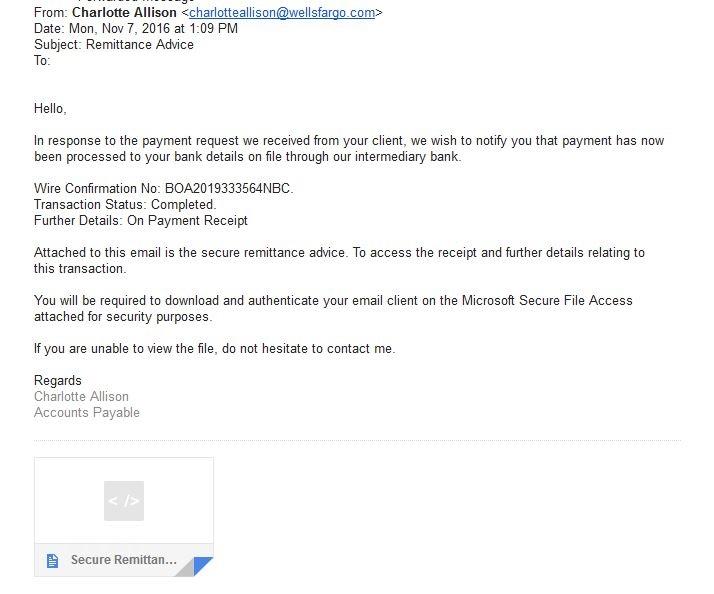


At first glance this looks legitimate. But looking closer:
  • Do we know anyone named Charlotte Allison?  That would be the first question.  If not, we should go no further until we check.
  • Look at the from address:  charlotteanderson@wellsfargo.com.  Have you been doing any business with Wells Fargo?  Instead of that stopping us, we have a tendency to open the attachment to see why in the world Wells Fargo would be sending us something.  BAD IDEA!  That is exactly the reaction the scammers want you to have.
  • If you simply hover your mouse pointer over the attachment without clicking, you can see that it is named “Secure Remittance.htm”.  HTM files are executable web programs.  So if you click on this attachment you would most likely be connected to some bogus web site to do you harm.  Another red flag.
And then we should think about this email from the opposite point of view:
  • This email is so very generic.  It could be sent to anyone.  There is nothing that specifically references you as the recipient.  It doesn’t even identify the “Intermediary Bank” supposedly involved in this transaction. (it would be most unusual that people at Harding would send an email that said something generic such as ‘Dear User’)
  • Surely a message like this would at least provide a phone number to call in case you have questions.  In fact, it encourages you to contact Charlotte Anderson and then provides you with no contact information except replying to the email.
  • This scam even warns you in advance that by clicking on the attachment “You will be required to download and authenticate your email client” – So you are warned that you will be installing software on your computer and probably be expected to give away your username and password!  All scams should be so forthright!

So the only safe thing to do with this email -- delete it.
___________________________________________________________________

Even with all this seemingly dire information, all of us in IS&T want to wish you a jolly Christmas and holiday.


Friday, August 12, 2016

Welcome back - Fall 2016


Hello

The people in IS&T would like to welcome everyone to the beginning of the new school year - yes it really has started as we can see from the increase in activity around campus.

Who is New?

IS&T has welcomed some new people over the summer. You may well come in contact with them and see them around. Please say hello and welcome to them when you have a chance.

Beverly Rose

Beverly Perdue Rose's profile photo
Beverly is the Assistant to the CIO. Beverly had been retired for sometime. Before her temporary retirement, Beverly Directed the Media Center. She is located in Admin 200E.

Bryan Davis

Bryan Davis has joined Client Support & Consulting.  He comes to us with nearly 8 years of IT support experience and COMPTIA certification. You may well talk with Bryan when you call the Help Desk on extn 4440.

Jonathan James

Jonathan has past experience with KATV in Little Rock and Young Avenue Sound in Memphis where he installed analog and digital mixing suites for the Delta Music Institute in Cleveland Mississippi.  His most recent job was with Quality Office Inc serving on the technical repair staff. 
Jonathan welcomes the opportunity to serve you to make your productions and presentations work flawlessly!

Emellia Cline

Emellia is working in the Public Services department, overseeing the Interlibrary Loan services.  Emellia came to us from working at the Crystal Bridges Museum library.

Dr Diana Tepe

Diana has a Doctor of Education in Instructional Design from the University of Memphis. She has taken the role of Lead Instructional Designer. She has worked for a number of years developing and delivering on-ground, online and computer-based instruction courses. She has also taught for five years at the University of Memphis.

Pokemon Go

Yes, it is happening on campus. There are Pokestops and Pokemon Gyms around the campus. No doubt you will see many (students, faculty and staff) walking around with phones out and stopping occasionally to capture a Pokemon or stock up their supplies at Pokestops.

I predicted that this would inspire some to find a way to use the Pokemon concept for an educational use. Here is one such example that I was shown: Pokemon Go and Geography Lessons

Who knows, by the time the Technology Showcase comes around, there may be lures set up at the showcase venues!

Pipeline

The redesigned and rebuilt Pipeline is now LIVE! We have received a lot of helpful feedback. Thank you all who sent feedback. It is appreciated. We are working through that feedback and will address what we can as soon as we can.

A couple of things to note:

  • There is a video that highlights some of the features and operation of the new Pipeline - Pipeline Video
  • It is very mobile friendly
  • There is a Favorites option. This is useful for you to bookmark the options you use most often.
    • When you open up a bar eg Academic, Administrative, Personal etc you will see a list of options (they are in alphabetical order). After you click on a menu option you will see a star at the top right of that option. Click on that star at it will be saved as one of your favorites.
    • The Favorites can be accessed by clicking on Favorites, right above the menu bars:


Summer Highlights

Summer is always a very busy time for many in IS&T. Here are some of the highlights of what has been happening in IS&T:

  • Replaced 760 PCs. This meant setting up new machines, delivering the new machines, retrieving the old machines, cleaning the hard drives and, packing and shipping them back to the leasing company.
  • Conducted numerous training programs, including at our campuses in Memphis and Rogers.
  • Selected Ritter to provide our phone trunks. These should be up and running by mid-September. Ritter brought a number of benefits with the phone trunks including local and long distance calling. This means after the trunks are installed, we will not need PAC codes and will not be billed for local or long distance calls. HOWEVER, international calls will still require a code and will be billed separately.
  • Check out the Libguide to see what is new in the Brackett Library - What's New in the Library
  • Public labs and the classrooms have been re-imaged and Windows PCs are now running Windows 10 and Apple PCs running El Capitan
  • In addition to normal operations, provided support to: Special Olympics, Home School Graduation, Arkansas Youth Conference, National Youth Conference, Christian Academy Conference, Stampede 1, 2, and 3, Impact, McNair Scholar's Research Presentations, Day of Caring..
  • Verizon began the implementation of a Distributed Antenna System on-campus. It is not live as yet, but they are making good progress.
  • Kept up with the IT infrastructure side of all the construction projects

Changes to Email

We have been working on making our email safer and more secure. We are introducing these features slowly so not to cause any drastic changes.

The features being implemented will make it much harder for anyone to 'spoof' our harding.edu emails. It will make no difference when we send and receive emails that are directly from or to our harding.edu email address.

However, if someone sends or receives an email from a source other than harding.edu, but makes it look like it is from harding.edu, that mail will come under more scrutiny.

Overall that is a good thing but there maybe some cases where doing this is ok. We have tried to catch those, but if you have emails that you are wanting to send from another source such as a bulk email company, but have it look like it is from harding.edu, please contact John Nunnally (jnunnally@harding.edu) and he can help set you up so your emails will work. Please make sure that there is a legitimate business reason for doing this. The aim of this action is to help keep us more safe and secure in our email system. Thanks.


Sunday, February 28, 2016

Sunday Morning Fiber Repair Update

The crew working on repairing the fiber cut have completed doing what is needed to the ends of the fiber in the fiber room. (We ran new fiber rather than have two splices) They will be back Sunday morning to do the splice in a tunnel out the back of the Admin Building.

Once the splice is completed, IS&T will test all the strands of fiber and patch them back into our campus network.

We are still on track to be back up by or before Monday morning.

Fiber splicing is a tedious and time consuming activity.


We also heard that Starbucks cards and the Starbucks app are not working at the moment! Once the fiber is repaired, they will work again! I know that it is serious business when people cannot get their coffee :-)

Saturday, February 27, 2016

February 2016 Fiber Cut.


As you have probably heard, some fiber cable was cut on Friday. It was cut by a contractor helping us complete repairs following the fire in the mechanical building behind the Health Sciences buildings late last year. The cut fiber took out internet and VoIP services to the following locations:
  • Thornton
  • American Studies
  • Kendall Dorm
  • Searcy Hall
  • Sears Hall
  • Women's Laundry
  • Honors/International House
  • Sears/Searcy Mechanical building
  • Transportation Office in the house that was previously the Nurse's Office
  • ARAMark's Ritter connection - their cable runs from Heritage, through Thornton to Admin and out on our Ritter presence there.
  • The Bookstore
  • All phones in the various buildings because they had been moved to VoIP.
  • All CATV in these buildings since we distribute the signal over fiber to the building machine rooms.
  • Some security cameras
That is quite a list!

Of course, people from IS&T and the contractor are working over the weekend to restore services. It is a big job.
It is estimated that the fiber will be repaired on Monday, hopefully by Monday morning.

It would have been possible to move all of these connections to our redundant routes and test to assure the new routes worked. This option may have restored services a bit earlier, but not too much. 

Given this was the first weekend of Spring Break, we decided to push ahead with the repairs and not re-route to the redundant loops. We apologize for the inconvenience. We understand that some students did not get access to Canvas in order to complete some work before going on Spring Break. Thanks to those faculty who accommodated this.

We will let you know when the repair has been completed.

Monday, January 25, 2016

An Olio...

This post is a collection of somewhat unrelated items. However, we think you will discover some useful information.

Millennials Have Come of Age.

Each year at the beginning of the Fall we read the report from Beloit College that tells us the mindset of incoming freshman. You can read that report here: Beloit Mindset List.

Recently someone shared an infographic prepared by Goldman Sachs that contained some interesting information about the group of people we have labelled millennials. Millennials are now hitting their prime spending years! Apart from being a very good infographic, rich in content, it tells us something about our world today.

Check it out here: Millennials Infographic


Worst Passwords for 2015

No doubt some of you have read the recent report that tells us what the most popular passwords used! How do they even know that? (They do tell us the method used to find out this information in the article). The most used password is 123456. Second is the actual word itself, password. Are you amazed that people are still content to protect their valuable information with such weak and predictable passwords?

Have a look at the full article here: World's Worst Passwords for 2015


Digital Disruption

Worlds largest taxi company does not own any cars!
Worlds largest movie house does not own any theaters!

These are two of the interesting things to contemplate from a recent article from IBM. You can read more about it here: Digital Disruption - IBM

Here is a the graphic from the article:


It is also good for us to contemplate how the digital disruption has and will occur in higher education. It will happen! Are we ready?


Google Mail Add-ons


Top 10 Gmail Labs and Features You Should Enable

If you want to add more features to your web based Google Mail then have a look at these top 10 add-ons. I use several of these. Find the list here: Top 10 Google Mail Add-ons


Friday, November 20, 2015

BitTorrent is being disabled!

After reading the title, many of you will probably skip reading this! Well that is fine, because if the title is foreign to you, then you will not be concerned about the service being disabled. However, you may still want to read the article to have an idea why. A number of students will miss not have BitTorrent available and you may hear some of their concerns. Knowing the reason why may help inform any conversation you have with these students.


Universities are increasingly becoming targets for criminals who want to steal personally identifiable information. This allows them to access all sorts of things about people such as: SSN, bank information, loan information, vehicle tags and even information about relatives and friends of the person. We take our custodian role of your data very seriously.


Additionally, media outlets and law firms are aggressively pursuing people who are illegally downloading their copyrighted material. We receive 2 or 3 notices a day about Digital Millennial Rights Copyright Act (DMCA) breaches. These notices come with some hefty fines.


Taking this and other factors into account we have decided to disable the BitTorrent service (and other similar services) on Harding's campus. We will do this over the Thanksgiving break.

Why? One of the most prolific channels for illegal downloading and other security concerns is through BitTorrent. We have researched this for some time and have looked into how other universities have dealt with these issues. It seems that we will be joining many other universities who have found no other way to stop these illegal and dangerous activities other than by blocking BitTorrent.


We are aware that BitTorrent can be used for legitimate purposes. However, we have reached a time where the non-legitimate uses far outweigh the legitimate uses.  If you have been using BitTorrent for legitimate uses and it is difficult for you to find alternative ways of getting the material you are after, please contact our Client Support on extension 4440 or itshelp@harding.edu for help with this.

Thank you for your understanding as we do our best to keep Harding IT environment secure and legal.

Thursday, October 15, 2015

Be Cyber Savvy


“My account has been hacked!”  


We hear this regularly, but in almost every case that is not an entirely true statement. 

Hacking involves a person using technical methods to find a way around the security of systems and expose data that was supposedly secure.  Yes, such security breaches happen and when they do they make headline news.  But when a single personal account is compromised, “hacking” is usually not the reason.  In almost all cases of individual account compromises, we are simply fooled into giving away our private data or account credentials to a scammer.  It isn’t very high tech.

Protect yourself.  

  • Take the time to learn about “Phishing” and “Spear Phishing”.  This is something that anyone using technology should be doing. It is like being a pedestrian and learning how to safely cross the street, we just have to do it. Check out the “Valparaiso University Phishing Awareness” video at YouTube.  It is a VERY good video done by a Google Apps school.
  • Avoid randomly clicking on unfamiliar web links that pop up in a search result or in an advertisement. 
  • Don’t use a single password for all of your accounts. When you do, one mistake compromises ALL of your accounts!  


New security threats.

  • Nearly all of us are carrying a smart phone now which is, in essence, a small computer.  And like all computers these phones can be infected with malware.  We need to be using the same security techniques with our phones as we do with our computers:  
    • keep the software on your phone updated 
    • install software to help protect from malware.  There are some decent options out there for free.  One unfortunate employee recently had spam spewing from their e-mail account and it appears the source of the problem was malware on their Apple iPhone.
  •  As we all become more inclined to use the internet for shopping we have to remember to never use our Harding passwords for our other online accounts (Amazon, WalMart, etc.)  We know it's a bother to keep up with more than one password but please reserve your Harding password strictly for Harding use. Consider using tools like LastPass to manage your passwords.
Please ensure that your Harding password is different from other passwords you may use for your personal accounts.

What's new in office computing?

New update service

We are slowly implementing a new service that installs updates to a wide array of software on Windows computers.  Languard is scheduled to work overnight, as are most anti-virus scans, so you will want to leave you computer on overnight to avoid the having these things run during the day while you are trying to work.  We plan to evaluate the Apple version of the same product soon.


Secure Off Campus Connections

Harding now has a solution which will help protect your data when you must use your Harding laptop from an off-campus network.  Fortinet creates a secure connection to the campus network which not only protects any sensitive data you might need to access, but also gives you access to your M: drive and other departmental storage. Over the next few months we plan to install it on all Harding laptops.


New software

New software from Microsoft and Apple is being tested to make sure it works will with our campus tools.  Soon we will be looking for volunteers to help us test Windows 10, Mac OS 10.11 (El Capitan), and Office 2016 for Macs.  Once these are determined to be safe we will begin offering upgrades and training for those who would like to upgrade.  FYI Office 2016 is now available for iOS devices and it's free!


The material for this entry was written by Jim Baird and John Nunnally. Thank you Jim and John.