Search This Blog

Showing posts with label passwords. Show all posts

Wednesday, September 18, 2019

Good Habits of Personal Computer Use


Seven Habits.


       1. Lock your computer when you leave your office for some time

How do I lock my computer?

  • Windows computer - easy. Hit the Windows+L keys together. 


Related image

          2. When in doubt, restart your computer.

Many times when things get stuck, restarting your computer will clear the problem. So, do a restart first before calling the Help Desk.

               3. Get up and walk around.

Don't get stuck behind the screen for hours on end. Get up and walk around at least once every hour. Go outside, smell the roses, chase a squirrel or just enjoy the trees.

          4. Back Up

Don't be caught if something should happen to your hard drive. Have your data backed up, maybe in more than one place. There are some great data backup and synchronization tools. Some people don't want to pay for back-ups. But what value do you place on your data, including those tens of thousands photos.

Check these options (there are more than these options):

      5. Separate email accounts

Have one email for Harding business and another for personal and home business. This helps keep things in place and should anything happen where your HU account is lost, you will still have your personal and home business emails intact.

        6. Don't eat over your keyboard

Need there be any more said - there have been some really sticky and inoperable keyboards in the labs, library and other places.

        7. Passwords

  • Use a strong password
  • Don't use the same password on multiple accounts, at least don't use your Harding password on other accounts
  • Don't write your passwords down and store them next to your computer
  • Use a password manager (LastPass, Dashlane)


Monday, November 28, 2016

Have jolly and cyber safe time...

The time of the year where we use the word 'jolly' more than any other time of the year is upon us. It is a most wonderful time of the year for sure.

It is also the time when we are shopping! And increasingly we are shopping online. We all like get the boxes at the front door!

I don't like sending messages like this one. They make me feel a lot less jolly and more like a grinch.

When we are shopping online, we are giving different organizations a fair amount of our personal information. Therefore we should all take steps keep our usernames and strong passwords secure. Here are some tips how to do that: Tips for Secure Online Shopping.

In summary this article tells us:

  1. Don't shop at a site if you're not comfortable
  2. Never click on links from spam emails to make purchases
  3. Check the web address to make sure you are on the correct site
  4. Check that the site is secure
  5. Use a credit card or an online payment service
  6. Do not use a public computer to shop online
  7. Only use a secure connection when you place your order
  8. Use strong passwords
You may also see more email activity afterwards from various companies. Be on the lookout for phishing schemes. Here is some good advice on how to avoid being phish fried: Avoid Phishing Fraud. 

Maybe to help us sort through this a bit further, John Nunnally provided an analysis of how to deal with a real example that was recently received by people at Harding.'

Please take some time to take a look at this example.

_____________________________________________________________

No links! It Must Be Safe…. Wrong.

Phishing Scheme – Analysis, Case 1: Remittance Advice

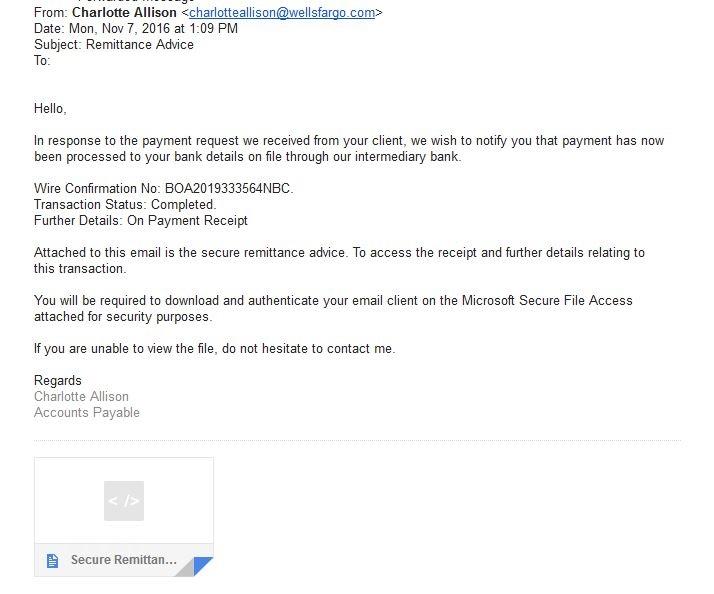
Here is a message recently received by a person at Harding:


At first glance this looks legitimate. But looking closer:
  • Do we know anyone named Charlotte Allison?  That would be the first question.  If not, we should go no further until we check.
  • Look at the from address:  charlotteanderson@wellsfargo.com.  Have you been doing any business with Wells Fargo?  Instead of that stopping us, we have a tendency to open the attachment to see why in the world Wells Fargo would be sending us something.  BAD IDEA!  That is exactly the reaction the scammers want you to have.
  • If you simply hover your mouse pointer over the attachment without clicking, you can see that it is named “Secure Remittance.htm”.  HTM files are executable web programs.  So if you click on this attachment you would most likely be connected to some bogus web site to do you harm.  Another red flag.
And then we should think about this email from the opposite point of view:
  • This email is so very generic.  It could be sent to anyone.  There is nothing that specifically references you as the recipient.  It doesn’t even identify the “Intermediary Bank” supposedly involved in this transaction. (it would be most unusual that people at Harding would send an email that said something generic such as ‘Dear User’)
  • Surely a message like this would at least provide a phone number to call in case you have questions.  In fact, it encourages you to contact Charlotte Anderson and then provides you with no contact information except replying to the email.
  • This scam even warns you in advance that by clicking on the attachment “You will be required to download and authenticate your email client” – So you are warned that you will be installing software on your computer and probably be expected to give away your username and password!  All scams should be so forthright!

So the only safe thing to do with this email -- delete it.
___________________________________________________________________

Even with all this seemingly dire information, all of us in IS&T want to wish you a jolly Christmas and holiday.




Monday, January 25, 2016

An Olio...

This post is a collection of somewhat unrelated items. However, we think you will discover some useful information.

Millennials Have Come of Age.

Each year at the beginning of the Fall we read the report from Beloit College that tells us the mindset of incoming freshman. You can read that report here: Beloit Mindset List.

Recently someone shared an infographic prepared by Goldman Sachs that contained some interesting information about the group of people we have labelled millennials. Millennials are now hitting their prime spending years! Apart from being a very good infographic, rich in content, it tells us something about our world today.

Check it out here: Millennials Infographic


Worst Passwords for 2015

No doubt some of you have read the recent report that tells us what the most popular passwords used! How do they even know that? (They do tell us the method used to find out this information in the article). The most used password is 123456. Second is the actual word itself, password. Are you amazed that people are still content to protect their valuable information with such weak and predictable passwords?

Have a look at the full article here: World's Worst Passwords for 2015


Digital Disruption

Worlds largest taxi company does not own any cars!
Worlds largest movie house does not own any theaters!

These are two of the interesting things to contemplate from a recent article from IBM. You can read more about it here: Digital Disruption - IBM

Here is a the graphic from the article:


It is also good for us to contemplate how the digital disruption has and will occur in higher education. It will happen! Are we ready?


Google Mail Add-ons


Top 10 Gmail Labs and Features You Should Enable

If you want to add more features to your web based Google Mail then have a look at these top 10 add-ons. I use several of these. Find the list here: Top 10 Google Mail Add-ons